
Phishing Attacks
How the attack works and how to prevent it





Web3 phishing attacks target the person approving a transaction rather than a flaw in contract code. A malicious signature can grant an attacker permission to transfer tokens or NFTs without exposing the victim's private key.
This guide explains approval phishing, wallet drainers, address poisoning, and frontend compromise. It also shows the transaction patterns users and auditors should examine before signing.
What Exactly is a Web3 Phishing Attack?
Traditional Web2 phishing often tries to steal credentials. A Web3 phishing attack instead tricks a user into signing a malicious blockchain transaction or off-chain message. That signature may grant explicit permission to transfer ERC-20 tokens, NFTs, or other assets.
Because Web3 applications rely on cryptographic signatures and smart contract approval mechanisms, an attacker may not need the private key. A valid approval signature can be enough.
The Restaurant Bill Analogy
Imagine signing a restaurant bill that contains an additional clause authorizing access to your bank account. The signature is valid, but its scope is much broader than expected.
That is the central problem in approval phishing. The user expects to authorize a routine action, such as verifying a wallet or claiming an airdrop, but instead approves access to assets.
The Impact of Web3 Phishing
Reported incidents show that phishing is a significant source of losses in the crypto ecosystem:
| Attack | Year | Impact |
|---|---|---|
| Bybit / Safe{Wallet} Hack | 2025 | $1.5B stolen via social engineering |
| $55M DAI Phishing | 2024 | Single victim, Inferno Drainer kit |
| Wallet Drainers Total | 2024 | $494M from 332K+ victims |
| $71M WBTC Address Poisoning | 2024 | Funds later recovered via negotiation |
| Radiant Capital | 2024 | $50M via developer social engineering |
| OpenSea Phishing | 2022 | $1.7M+ in NFTs from 32 users |
Published incident datasets put 2024 phishing losses at $1.05 billion across 296 incidents. That is close to half of all Web3 funds reported stolen that year.
The $55M DAI Phishing Incident
On August 21, 2024, an experienced crypto holder lost $55.47 million in DAI after signing a malicious transaction. The case shows that experience alone does not protect a signer when the transaction's effect is unclear.
What Happened
The victim, identified on-chain as 0xf2B8..., unknowingly signed a setOwner transaction on a DeFi Saver Proxy contract. The call transferred control of a highly collateralized Maker vault to the phishing address.
The campaign used Inferno Drainer, a phishing-as-a-service toolkit used to create sites that imitate legitimate DeFi interfaces.
Subsequent Transactions
After taking ownership of the Maker vault, the attacker:
-
Hijacked the protocol by switching the owner address to their own.
-
Minted 55,473,618 DAI directly into their wallet.
-
Swapped 27.5 million of that DAI for 10,625 ETH to start obfuscating the trail.
-
Routed the remaining funds across dozens of mixer addresses.
Calls that change ownership deserve explicit review. Published 2024 hack datasets attribute 31.9% of reported crypto hacks to a setOwner call.
Why the Attack Worked
The attack followed a common sequence:
-
Clicked a malicious link disguised as a standard DeFi interface.
-
Confirmed a prompt in their wallet, assuming it was a routine connection signature.
-
Did not identify that the transaction called
setOwner. -
Had no transaction simulation warning before approval.
That single signature accounted for more than 11% of the year's reported wallet-drainer losses.
Types of Web3 Phishing Attacks
Web3 phishing comes in several distinct forms, each exploiting different mechanisms:
Another technique is frontend hijacking, where attackers compromise a protocol's real website or deployment infrastructure and serve malicious transactions to users. The $1.5B Bybit incident and the $120M BadgerDAO attack both involved compromised trusted interfaces or infrastructure.
How Approval Phishing Works: Step-by-Step
Approval phishing (often called "ice phishing," a term Microsoft coined in 2022) exploits the same token approval system that makes DeFi work. Nothing in the attack is a code bug, which is why reading the calldata is the only reliable defense.
Why do token approvals even exist?
Many decentralized exchanges, lending protocols, and NFT marketplaces require users to approve a smart contract before it can spend their tokens. Unlike native ETH transfers, ERC-20 integrations commonly use allowances so another contract can call transferFrom().
The risk is that an attacker can substitute a malicious spender address for the legitimate protocol the user intended to approve.
The Classic Attack Flow
| Step | What Happens | State |
|---|---|---|
| 1 | Attacker creates phishing site mimicking a DeFi protocol | Victim's tokens safe |
| 2 | Victim connects wallet to fake site | Wallet connected |
| 3 | Site prompts victim to sign an approve() transaction |
Transaction pending |
| 4 | Victim signs - granting attacker unlimited token allowance | Approval granted |
| 5 | Attacker calls transferFrom() on the token contract |
Tokens being drained |
| 6 | All approved tokens moved to attacker's wallet | Wallet drained |
The 4 Phases of an Ice Phishing Attack
A typical approval phishing attack follows four steps:
The attacker promotes a phishing site via hacked social media accounts, fake airdrops, Google ads, or direct messages. The site closely mimics a legitimate protocol like Uniswap, OpenSea, or an airdrop claim page.
Once the victim connects their wallet, the drainer script scans their holdings - identifying the most valuable tokens, NFTs, and staked positions. A command-and-control server decides which assets to target first.
The victim is prompted to sign a transaction - either an approve() call, a permit() off-chain signature, or a setApprovalForAll(). The wallet popup shows the action, but most users don't read the details.
The attacker uses the granted approval to call transferFrom(), moving tokens to their address. For NFTs, they use safeTransferFrom(). Often routed through legitimate protocols like SushiSwap to obfuscate the theft.
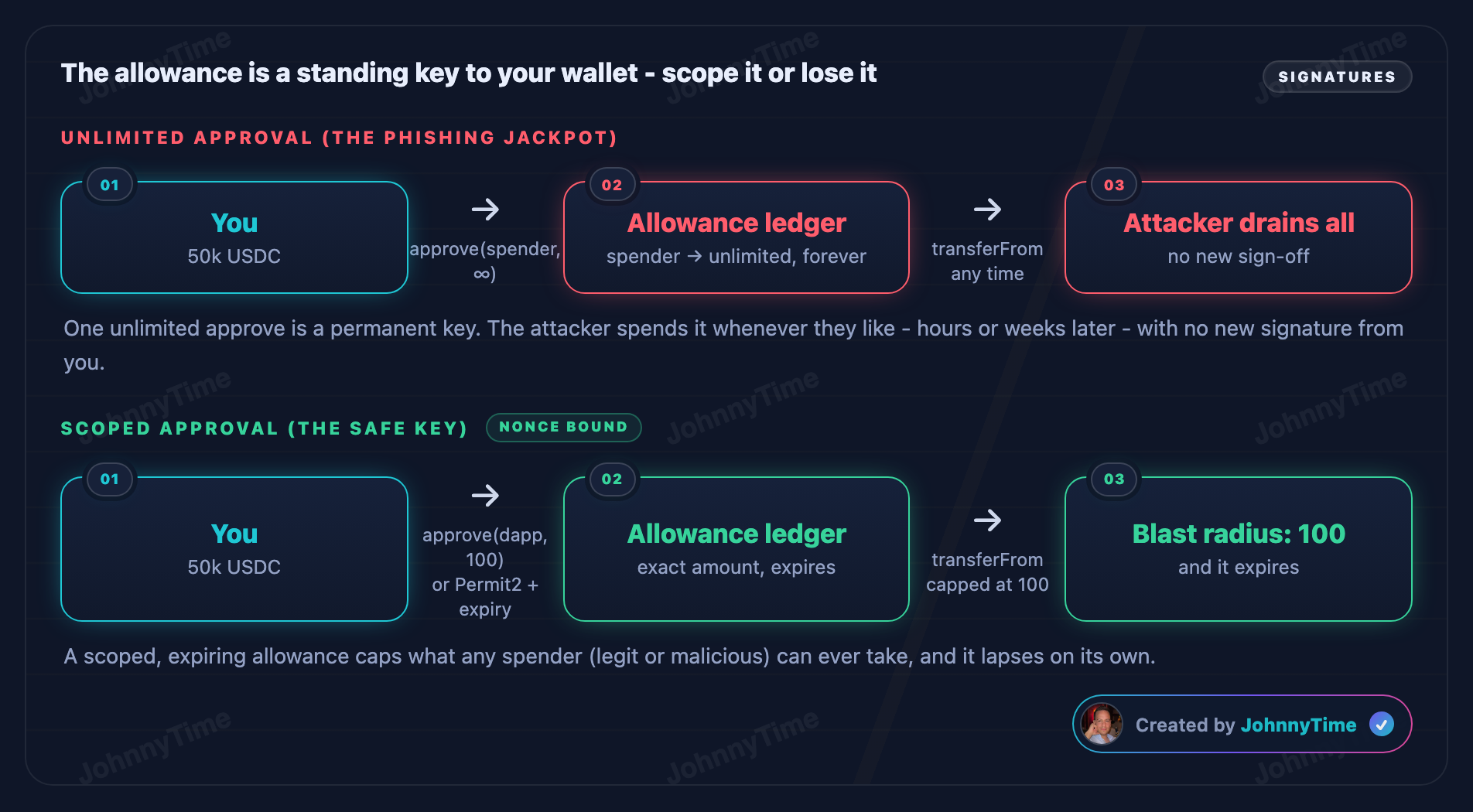
Unlike traditional hacks that exploit code, approval phishing only needs you to click "Confirm" once. The approval persists until you manually revoke it - the attacker can drain you hours, days, or weeks later.
The "Big Three" Functions Attackers Target
Three functions carry almost all of the losses:
| Function | Token Standard | What It Does | The Attacker's End Goal |
|---|---|---|---|
approve(spender, amount) |
ERC-20 | Allows a spender to transfer up to a certain amount of your tokens. |
Set the amount to max uint256 (effectively unlimited access). |
increaseAllowance(spender, amount) |
ERC-20 | Increases an existing allowance by a specified amount. |
Add a large allowance for the attacker's address. |
setApprovalForAll(operator, true) |
ERC-721 / ERC-1155 | Gives the operator permission to transfer all NFTs in a collection. |
Transfer every approved NFT in that collection. |
{
  "title": "🎬 Approval phishing: one signature, drained later",
  "stage": { "width": 920, "height": 440 },
  "nodes": [
    { "id": "victim", "label": "Victim", "role": "wallet: 50k USDC", "emoji": "🧑", "x": 60, "y": 200, "color": "cyan" },
    { "id": "token", "label": "USDC Token", "role": "approve / transferFrom", "emoji": "🪙", "x": 440, "y": 60, "color": "purple" },
    { "id": "attacker", "label": "Attacker", "role": "malicious spender", "emoji": "🎣", "x": 720, "y": 200, "color": "red" }
  ],
  "links": [
    { "from": "victim", "to": "token" },
    { "from": "attacker", "to": "token" },
    { "from": "token", "to": "attacker" }
  ],
  "nets": [
    { "id": "victim", "label": "Victim wallet" },
    { "id": "atk", "label": "Attacker" }
  ],
  "legend": [
    { "cls": "call", "label": "contract call" },
    { "cls": "token", "label": "token transfer" },
    { "cls": "sig", "label": "approval / signature" },
    { "cls": "fail", "label": "rejected / blocked" }
  ],
  "scenarios": {
    "Vulnerable (blind unlimited approve)": [
      { "note": "Victim holds 50,000 USDC. A pixel-perfect phishing site prompts what looks like a routine 'connect' signature.", "hi": ["victim"], "bal": { "victim": "50,000 USDC" }, "net": { "victim": "50,000", "atk": "0" } },
      { "note": "It is actually <b>approve(attacker, unlimited)</b>. The victim signs without reading the fine print.", "tone": "bad", "hi": ["victim","token"], "chip": { "from": "victim", "to": "token", "label": "✍️ approve(attacker, ∞)", "cls": "sig" } },
      { "note": "The token's allowance ledger now lets the attacker move <b>all</b> of the victim's USDC - forever, until revoked.", "tone": "bad", "hi": ["token"], "bal": { "token": "allowance: ∞" } },
      { "note": "Hours later, the attacker calls <b>transferFrom(victim, attacker, 50k)</b>. No new victim signature needed.", "tone": "bad", "hi": ["attacker","token"], "chip": { "from": "attacker", "to": "token", "label": "📞 transferFrom(50k)", "cls": "call" } },
      { "note": "The token moves every approved USDC to the attacker. The wallet is drained from a single past click.", "tone": "bad", "hi": ["token","attacker"], "chip": { "from": "token", "to": "attacker", "label": "💸 50,000 USDC", "cls": "token" }, "bal": { "victim": "0 USDC", "attacker": "+50k" }, "net": { "victim": "0", "atk": "+50,000" } }
    ],
    "Fixed (scoped approval + simulation)": [
      { "note": "Same lure - but the victim's wallet runs a transaction simulator that decodes the prompt before signing.", "hi": ["victim"], "bal": { "victim": "50,000 USDC" }, "net": { "victim": "50,000", "atk": "0" } },
      { "note": "It flags it: 'this grants UNLIMITED spend to an unknown address.' The victim rejects.", "tone": "ok", "hi": ["victim","token"], "chip": { "from": "victim", "to": "token", "label": "⛔ approve rejected", "cls": "fail" } },
      { "note": "For real use, the victim approves only the <b>exact amount</b> needed (or uses Permit2 with an expiry), never unlimited.", "tone": "ok", "hi": ["victim","token"], "chip": { "from": "victim", "to": "token", "label": "✍️ approve(dapp, 100)", "cls": "sig" }, "bal": { "token": "allowance: 100" } },
      { "note": "With no standing unlimited allowance, a phishing spender has nothing to drain.", "tone": "ok", "hi": ["victim"], "bal": { "victim": "50,000 USDC safe" }, "net": { "victim": "50,000", "atk": "0" } }
    ]
  }
}
Why Unlimited Approvals Increase Risk
The standard ERC-20 approval mechanism creates persistent authority that phishing campaigns can exploit.
The flaw is not in the token code. It sits in the habit, encouraged by most frontends, of granting permanent unlimited approvals.
The Risky Pattern in Action
// VULNERABLE PATTERN - DO NOT USE IN PRODUCTION
// This shows how unlimited approvals enable phishing attacks

contract VulnerableToken is ERC20 {
    // Standard ERC-20 approve - allows UNLIMITED approvals
    function approve(address spender, uint256 amount) public override returns (bool) {
        // No limit on amount - can be type(uint256).max
        // No expiration - approval lasts FOREVER
        // No notification - user may forget about this approval
        _approve(msg.sender, spender, amount);
        return true;
    }

    // A DeFi frontend typically requests:
    // approve(contractAddress, type(uint256).max)
    // This grants PERMANENT, UNLIMITED access to your tokens
}

// When a phishing site calls:
// token.approve(ATTACKER_ADDRESS, type(uint256).max)
// The attacker can drain ALL your tokens at ANY time
Why is this dangerous?
Four properties of the approval model do the damage:
-
Approvals default to unlimited amounts (
type(uint256).max) -
Approvals have no expiration - they last forever
-
Users can't easily see or manage active approvals
-
A single approval grants access to all tokens of that type
In March 2024 alone, ERC-20 tokens accounted for 89.5% of the $71.5 million lost to phishing that month.
Phishing Attacker Contract Example
Here's how an attacker exploits approvals they've obtained through phishing.
// ATTACKER CONTRACT - Educational purposes only
// Demonstrates how phishing-obtained approvals are exploited

contract PhishingDrainer {
    address public attacker;

    constructor() {
        attacker = msg.sender;
    }

    // After tricking a victim into calling:
    // token.approve(address(this), type(uint256).max)
    // The attacker can drain all their tokens:

    function drainERC20(
        IERC20 token,
        address victim,
        uint256 amount
    ) external {
        require(msg.sender == attacker, "Not attacker");

        // This works because the victim already approved this contract
        token.transferFrom(victim, attacker, amount);
    }

    // For NFTs, after victim calls:
    // nft.setApprovalForAll(address(this), true)
    function drainNFT(
        IERC721 nft,
        address victim,
        uint256 tokenId
    ) external {
        require(msg.sender == attacker, "Not attacker");

        // Transfer NFT from victim to attacker
        nft.safeTransferFrom(victim, attacker, tokenId);
    }

    // Advanced: Drain multiple tokens in a single transaction
    function drainMultiple(
        address victim,
        IERC20[] calldata tokens,
        uint256[] calldata amounts
    ) external {
        require(msg.sender == attacker, "Not attacker");

        for (uint i = 0; i < tokens.length; i++) {
            uint256 balance = tokens[i].balanceOf(victim);
            uint256 amount = amounts[i] < balance ? amounts[i] : balance;
            tokens[i].transferFrom(victim, attacker, amount);
        }
    }
}
Attack Execution Summary
-
Deploy the drainer contract (or use a drainer-as-a-service kit)
-
Lure victims to a fake site mimicking a legitimate protocol
-
Request approval - the wallet popup asks to approve the drainer contract
-
Wait - the approval persists indefinitely
-
Call
drainERC20()ordrainNFT()to steal all approved assets
Modern wallet drainers like Inferno Drainer automate the whole flow. The kit scans the connected wallet for valuable assets and builds the drain transaction itself.
How to Prevent Phishing Attacks: Best Practices
Reducing phishing risk requires controls across contract permissions, application infrastructure, wallet interfaces, and user signing practices.
What it does: Tools like Pocket Universe, Fire, and Blowfish simulate transactions before you sign, showing you exactly what will happen - including token transfers, approvals, and ownership changes.
When to use: Install as a browser extension and use for every transaction. They intercept wallet popups and add human-readable warnings.
Limitation: Cannot protect against all social engineering - a determined user may still click through warnings.
What it does: Revoke.cash and Etherscan's Token Approval Checker let you view and revoke all active token approvals. Regularly cleaning up old approvals reduces your attack surface.
When to use: Check and revoke unused approvals monthly. Immediately revoke any suspicious approvals.
Limitation: Costs gas to revoke each approval. Cannot undo damage if tokens were already drained.
What it does: Hardware wallets require physical confirmation of every transaction. Always verify the full address and transaction details on the hardware device screen.
When to use: For any wallet holding significant value. Use separate wallets for DeFi interactions vs. long-term storage.
Limitation: Hardware wallets cannot parse complex multisig transactions (as demonstrated in the Radiant Capital hack). Users may still blindly confirm.
What it does: Instead of approving type(uint256).max, approve only the exact amount needed for each transaction. Many wallets now let you edit the approval amount.
When to use: Every time a dApp requests a token approval. Manually reduce the amount to match the actual transaction.
Limitation: Requires extra gas for re-approvals. Many dApps default to unlimited and users don't change it.
Phishing-Resistant Approvals in Smart Contracts
As developers, we have a responsibility to protect our users. Here is how smart contracts can and should be designed to severely minimize phishing risks using modern safety patterns.
// SECURE CONTRACT - Phishing-resistant token approval pattern
// Uses expiring approvals and amount limits

contract PhishingResistantToken is ERC20 {
    // IMPROVEMENT 1: Approval expiration
    struct Approval {
        uint256 amount;
        uint256 expiry;
    }

    mapping(address => mapping(address => Approval)) private _timedAllowances;

    event ApprovalWithExpiry(
        address indexed owner,
        address indexed spender,
        uint256 amount,
        uint256 expiry
    );

    // STEP 1: CHECKS - Validate the approval parameters
    function approveWithExpiry(
        address spender,
        uint256 amount,
        uint256 duration
    ) public returns (bool) {
        require(spender != address(0), "Invalid spender");
        require(amount > 0, "Amount must be positive");
        require(duration <= 30 days, "Max approval: 30 days");

        // STEP 2: EFFECTS - Store approval with expiration
        uint256 expiry = block.timestamp + duration;
        _timedAllowances[msg.sender][spender] = Approval({
            amount: amount,
            expiry: expiry
        });

        emit ApprovalWithExpiry(msg.sender, spender, amount, expiry);
        return true;
    }

    // Override transferFrom to check expiration
    function transferFrom(
        address from,
        address to,
        uint256 amount
    ) public override returns (bool) {
        Approval storage approval = _timedAllowances[from][msg.sender];

        // STEP 1: CHECK - Is the approval still valid?
        require(block.timestamp <= approval.expiry, "Approval expired");
        require(approval.amount >= amount, "Insufficient allowance");

        // STEP 2: EFFECTS - Decrease the allowance
        approval.amount -= amount;

        // STEP 3: INTERACTIONS - Execute the transfer
        _transfer(from, to, amount);
        return true;
    }
}
Security Features
| Feature | Protection | How It Helps |
|---|---|---|
| Expiring approvals | Time-limited access | Even if phished, approval auto-expires in 30 days max |
| Exact amounts | No unlimited access | Attacker can only drain the approved amount, not everything |
| Event logging | Transparency | Wallet UIs can display active approvals with countdown timers |
| Amount tracking | Spend accounting | Each transfer reduces the remaining allowance |
Uniswap's Permit2 implements expiring approvals. Its AllowanceTransfer contract stores a uint48 expiration with each user approval, while SignatureTransfer supports one-time signatures that cannot be reused after consumption.
Advanced Phishing Variations
Phishing techniques change as wallet interfaces and approval standards evolve. The following variants require different checks from a standard on-chain approve() call.
1. Off-Chain Permit Signature Phishing
One approval-phishing variant uses EIP-2612 permit() to obtain approval through an off-chain signature. The victim pays no gas and submits no on-chain transaction; the attacker can relay the signed message later.
How it works:
-
You are prompted to "verify" your wallet by signing what looks like a harmless message.
-
The structured message contains the token address, spender, approved amount, deadline, and nonce.
-
The attacker takes your raw signature and submits it on-chain via the
permit()function. -
With a valid approval, the attacker calls
transferFrom()to move the approved tokens.
This variant is easy to miss. Because the victim signed a message rather than a transaction, the approval does not initially appear in on-chain history, and some wallet interfaces have historically shown very little detail for these signatures.
The largest single phishing theft of 2025 was $6.5 million in September, caused directly by a malicious Permit signature.
2. Address Poisoning
Address poisoning targets a habit almost everyone in crypto has: copy-pasting addresses directly from their transaction history.
Attack sequence:
-
The attacker generates a "vanity" wallet address that matches the first 4-6 and last 4-6 characters of an address you frequently use.
-
They send you a tiny amount of tokens, or a zero-value transaction, from that lookalike address.
-
The lookalike address now sits in your recent transaction history on block explorers and wallet interfaces.
-
You copy the address from history and send funds to the attacker.
Real incidents:
-
December 2025: A trader lost $50M in USDT after copying a poisoned address. Binance's CZ later pushed for wallet-level poison address blocking.
-
May 2024: A victim lost $71M in WBTC but recovered funds after negotiating with the attacker.
-
November 2023: Florence Finance lost $1.45M USDC to the same technique.
Published address-poisoning research counts over 270 million attempts across Ethereum and BNB Chain, and $83 million in confirmed losses.
3. Frontend Hijacking
Some phishing campaigns never build a fake site at all. They compromise the protocol's real one.
Bybit / Safe{Wallet} (2025)
Attackers compromised a Safe{Wallet} developer via social engineering, stole AWS session tokens, bypassed MFA, and injected malicious JavaScript that replaced Bybit's transaction destination. The team signed what appeared to be a routine transfer.
Radiant Capital (2024)
A developer received a Telegram message from a "contractor" with a malicious PDF. The INLETDRIFT malware intercepted Gnosis Safe transactions, replacing them with transferOwnership() calls. Ledger wallets couldn't parse the multisig data.
BadgerDAO (2021)
Attackers compromised BadgerDAO's Cloudflare API key and injected malicious scripts into the frontend. Users visiting the legitimate site were prompted to sign increaseAllowance() transactions granting the attacker unlimited token access.
4. Wallet Drainer-as-a-Service (DaaS)
Some Web3 phishing operations use commercial drainer-as-a-service kits. Operators distribute subscription tools through private forums or messaging channels and may provide interface updates, support, and automated revenue sharing.
Examples of drainer services:
| Drainer | Active Period | Estimated Stolen | Business Model |
|---|---|---|---|
| Monkey Drainer | Aug 2022 - Feb 2023 | $16M+ | 30% cut + $1,000 entry fee |
| Inferno Drainer | Mar 2023 - Q4 2024 | $81M+ | Revenue sharing |
| MS Drainer | 2023 | $59M+ | Sold to 63,000+ victims |
| Angel Drainer | 2023-2024 | $20M+ | Market leader by Q1 2024 (42%) |
| Pink Drainer | 2023 - Q2 2024 | Significant | Exited market mid-2024 |
| Acedrainer | Q4 2024+ | Growing | Captured 20% market share rapidly |
In Q1 2024, three kits (Angel, Pink, and Inferno) accounted for 92% of drainer activity. Pink exited later that year, and Acedrainer took roughly 20% of the market within a single quarter.
Common Phishing Misconceptions
Several common security assumptions do not account for approvals, off-chain signatures, or compromised frontends:
"Hardware wallets protect you from phishing attacks."
Tap to revealHardware wallets protect your private keys, but they still require you to approve transactions. If you confirm a malicious approval on your Ledger or Trezor, the attacker gets permission to drain your tokens - as demonstrated in the $50M Radiant Capital hack.
"Phishing only steals private keys or seed phrases."
Tap to revealWeb3 phishing rarely targets private keys. Instead, it exploits the approval mechanism - tricking you into granting token spending permission. Your keys stay safe, but your tokens don't. This is why it's called "ice phishing."
"If I don't see a suspicious transaction in my history, I'm safe."
Tap to revealPermit signature phishing operates entirely off-chain. The victim signs a message (not a transaction), so the approval never appears in transaction history. The attacker submits it later. Address poisoning also works by planting fake entries IN your transaction history.
"Approvals are safe because I only approved a legitimate protocol."
Tap to revealApproving a legitimate protocol IS safe - the danger is that approvals are permanent and unlimited by default. If that protocol gets hacked later (like BadgerDAO's frontend), your existing approval becomes the attack vector. Always revoke unused approvals.
Related Web3 Vulnerabilities
Phishing attacks often overlap with permission and external-call risks:
-
Access Control Attacks: Both involve unauthorized permission grants, whether caused by a code flaw or social engineering.
-
Call Attacks: Drainers rely on external calls and token transfer functions after obtaining approval.
-
Flash Loan Attacks: An attacker may combine obtained permissions with borrowed liquidity to manipulate a victim's DeFi positions.
Test your Web3 phishing IQ
Test your Web3 phishing knowledge
5 questions on approvals, permits, and drainer behaviour
Frequently Asked Questions (FAQ): Web3 Phishing
A Web3 phishing attack is a scam that tricks you into signing a malicious blockchain transaction, unknowingly giving a hacker permission to steal your cryptocurrency or NFTs. Unlike traditional Web2 phishing that steals your passwords, smart contract phishing exploits token approval mechanisms. You keep your private keys securely in your hardware wallet, but you still lose all your assets because you cryptographically signed a malicious approval.
Phishing was the most costly attack vector in 2024, with over $1 billion lost across 296 incidents. Wallet drainers specifically stole $494 million from 332,000+ victims in 2024. Since May 2021, Chainalysis has tracked approximately $1 billion in approval phishing losses alone. Including the $1.5B Bybit hack in 2025, total phishing-related losses in Web3 exceed several billion dollars.
A wallet drainer is a malicious script embedded in phishing websites that automatically scans your wallet for valuable assets and generates optimized transactions to steal them. When you connect your wallet and sign the transaction, the drainer uses approve(), permit(), or setApprovalForAll() to gain permission, then transfers your assets to the attacker. Drainer kits are sold as a service (DaaS) with the operator taking a 20-30% cut.
Use Revoke.cash or Etherscan's Token Approval Checker to view all active approvals on your wallet. Connect your wallet, review each approval, and revoke any that are no longer needed - especially unlimited approvals to contracts you no longer use. This costs a small amount of gas per revocation.
Yes. Any EVM-compatible chain (BNB Chain, Polygon, Arbitrum, Avalanche, Base, etc.) is susceptible because they all use the same ERC-20/ERC-721 approval mechanism. Address poisoning attacks have been documented across all major EVM chains. Non-EVM chains like Solana have their own phishing vectors targeting token account delegations.
Address poisoning is when an attacker sends tiny transactions from a wallet address that looks similar to one you frequently use. When you later copy an address from your transaction history, you might accidentally paste the attacker's lookalike address. Protect yourself by always verifying the full address (not just first/last characters), using address book features, sending test transactions first, and using ENS names when possible.
Anti-Phishing Checklist
Use the relevant checklist for wallet activity or protocol development:
For Everyday Web3 Users
-
Install a transaction simulation tool (Pocket Universe, Fire, or Blowfish)
-
Use a hardware wallet for significant holdings
-
Never approve unlimited token amounts - edit to exact amounts needed
-
Regularly check and revoke unused approvals via Revoke.cash
-
Verify the full address when sending transactions - not just first/last characters
-
Never sign messages or transactions from links in Discord, Twitter, or email
-
Use separate wallets: hot wallet for DeFi, cold wallet for storage
-
Send a small test transaction before large transfers to new addresses
-
Bookmark DeFi sites - never click links from search ads or social media
For Protocol Developers & Smart Contract Auditors
-
Implement expiring approvals in token contracts (like Permit2)
-
Request exact approval amounts in your frontend, not
type(uint256).max -
Add Content Security Policy headers to prevent script injection
-
Use Subresource Integrity (SRI) for all external scripts
-
Implement transaction preview/simulation in your dApp UI
-
Display clear, human-readable approval details to users
-
Monitor for unauthorized changes to your frontend deployment
-
Secure CI/CD pipelines and cloud credentials with hardware keys
Practice Phishing Analysis
Reading transaction details is useful, but security review also requires practice tracing approvals and testing their limits in a controlled environment.
The Smart Contract Hacking course includes:
-
320+ video lessons covering approval exploitation, signature phishing, flash loan attacks, reentrancy, and related topics.
-
40+ hands-on exercises for exploiting and securing vulnerable contracts.
-
Instruction from JohnnyTime, Trust, Pashov, and other working security researchers.
-
A 2,000+ member Discord community for technical discussion and peer support.
-
SSCH Certification for participants who complete the requirements.
You can review student outcomes and success stories before deciding whether the course fits your goals.
Practice smart contract security
Build your auditing skills with guided exploit exercises in the Smart Contract Hacking course.

Start your free security training
Get 25 free lessons and 4 guided exploit exercises.
Onboarding details by email within 2–3 business days.